PLATFORM macOS 13+SIZE ~200 MBRAW CR3 NEF ARW RAF DNG +5f/2.8 · 1/500 · ISO 400

Browse fast.
Select. Export. Ship.

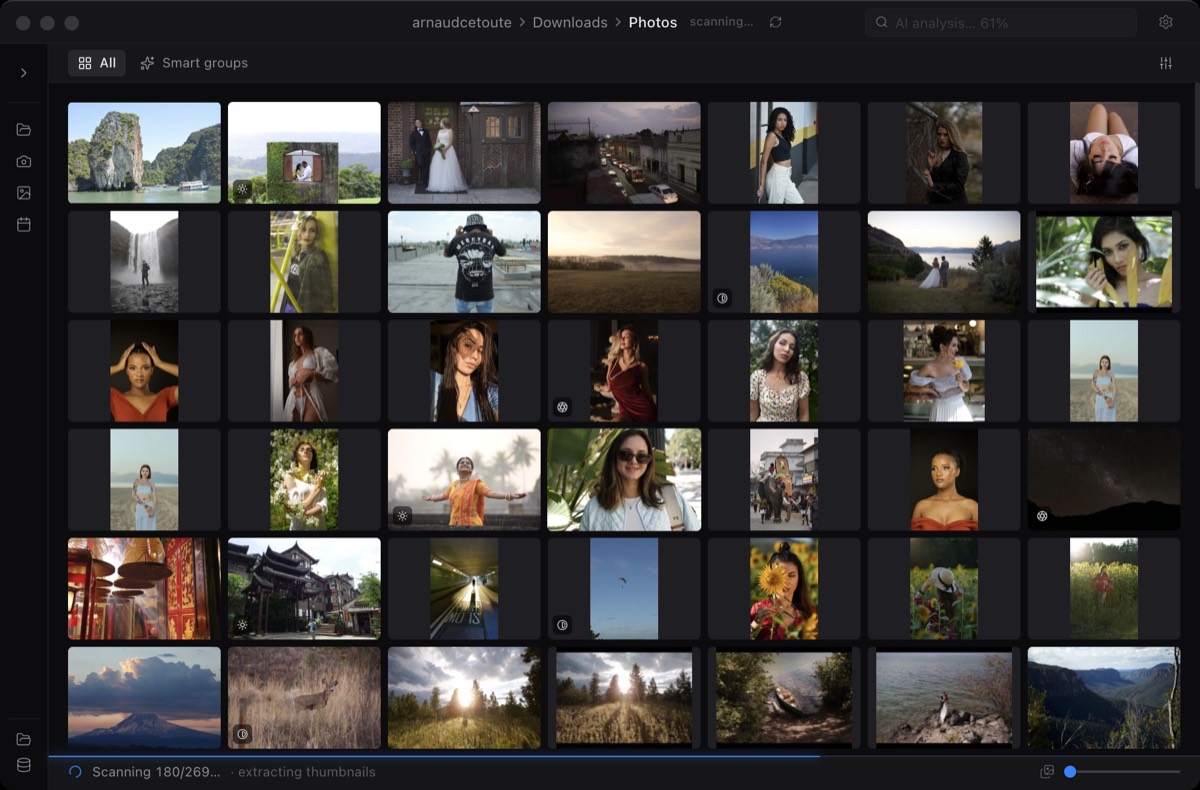
Miri opens any folder of RAW photos on your Mac and shows you every frame in seconds. Browse, select, export. No catalog. No import. No wait.

v1.0.2 · ~200 MB · macOS 13+
01BEFORE THE WORK BEGINS시작 전에

The frames are there.
Finding them is the bottleneck.

~45min
to complete a first pass on a wedding shoot with a standard photo manager — after the import finishes.
기다림 · waiting
18GB
minimum install footprint of a classic photo suite, just to browse your RAW files before any editing.
무게 · weight
30+min
waiting before you see the first decoded frame of a fresh shoot — every time you come back from the field.
지연 · delay
02THE LOOP 루프

Open. Select. Done.

01
Open the folder.
Drop a folder — from your SSD, an SD card, an external drive, a network share. First thumbnails appear in under 3 seconds. The full 1,000-photo grid finishes in under 30. Reopen the same shoot tomorrow: cache is warm, you're back in under 2 seconds.
02
See what to skip.
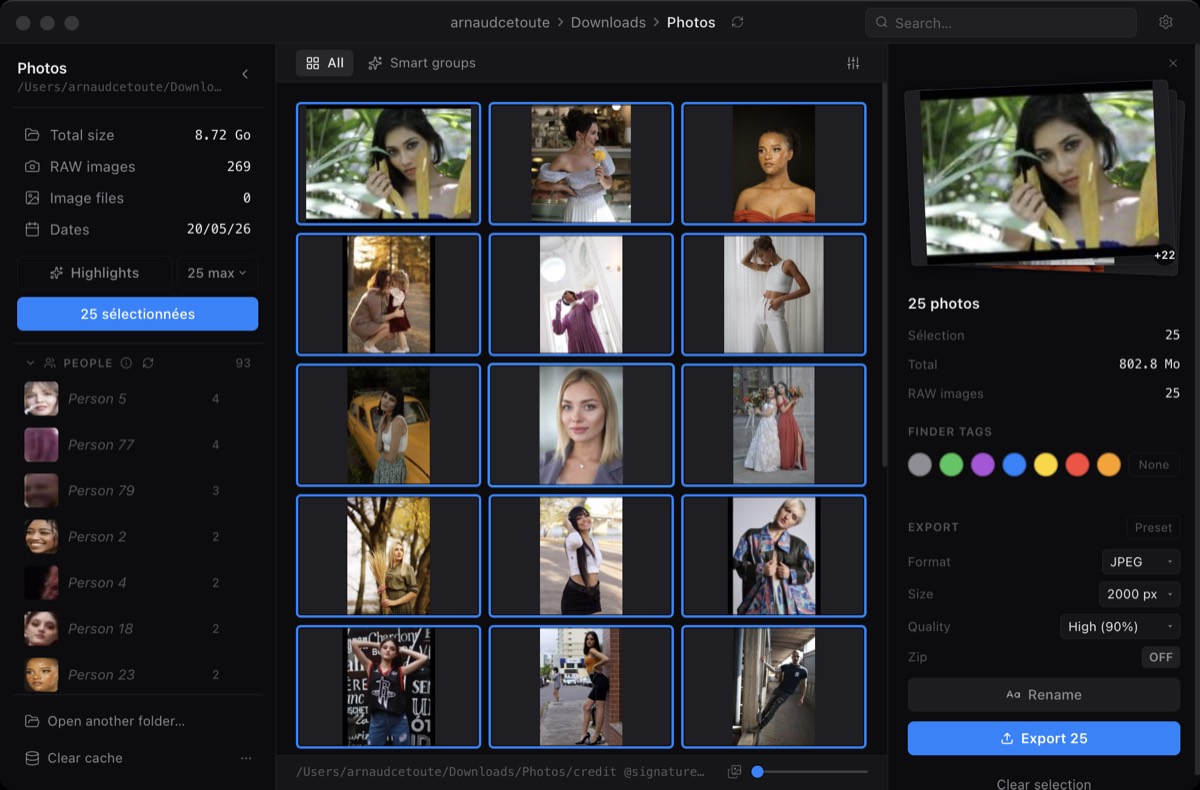
Smart flags appear on thumbnails after analysis — blur, duplicates, exposure issues. No rating ceremony. Click to select. Shift-click or ⌘-click to build the set you want to export.
03
Export and move on.
Choose a destination folder, a size, a quality, and a format. Selected files are exported, zipped if you want, in seconds. Originals stay exactly where they were on disk.
03WHAT IT DOES 기능

Fast previews. Smart flags. Clean exports.

Miri does the part of the job nobody likes. The rest stays in the editor you already love.

No catalog · no import · no library

It opens your folder. That's all.

Your shoots live where they live — on your SSD, an SD card, an external drive, a network share. Miri reads them in place. Nothing gets imported. Nothing gets duplicated. Close the app and your filesystem is exactly as you left it.

Warm cache

The second time, it's instant.

Reopen yesterday's shoot and Miri restores the grid in under 2 seconds. Your decoded previews don't expire when you close the lid.

FIRST OPEN 18sRE-OPEN 1.8s
RAW formats

Whatever's in your card slot.

Native support for every major camera. New format on the market? It'll be in the next free update.

CR2CR3NEFARWRAFDNGORFRW2PEF
Originals untouched

Your RAWs are not yours to risk.

Nothing happens to your originals without an explicit confirmation. No silent moves, no auto-renames, no quiet metadata writes.

READ ~/Photos/*.CR3
WRITE ~/Deliveries/*.jpg
TOUCH nothing else.
04PRO · ONE-TIME UPGRADE 일회성 업그레이드

AI that culls while you think.

Highlights · AI

A suggested shortlist before you've finished your coffee.

An on-device model scores frames on sharpness, exposure, composition and aesthetics, then selects a shortlist. Keep it, adjust it, or clear it. Final selection is always yours.

Semantic search · AI

Type what you remember. Get there in one second.

“Bride laughing”, “ring shot”, “first kiss”, “kid with cake”. Runs on-device. Works in three languages. Works even when you never added a keyword in your life.

Face recognition · AI

Cull a wedding by guest, not by chronology.

Clusters faces locally — never leaves your Mac. Tag a face once; Miri remembers it across every shoot you'll ever do.

Batch rename

Name 1,200 files at once. Without writing a script.

Token-based templates with EXIF data, sequence numbers, your custom fields. Save your formats. Never type a filename again.

Get Pro — €79 onceNo subscription · 2 Macs per license · all future updates
05PRICING 가격 전략

Try free. Buy once.

Free
€0forever

The whole core loop. Open, select, export.

  • All RAW formats, fast previews
  • Folders of any size, from any drive
  • Smart flags: blur, duplicates, exposure issues
  • Click / shift-click / ⌘-click selection
  • JPEG export with size and quality
  • Originals never touched
  • AI Highlights
  • Semantic search
  • Face recognition
  • Token-based batch rename
Download Free
macOS 13+ · ~200 MB · Intel Mac?
Pro
Launch offer
€59.25one-time€79
Code EARLY
Ends June 30

For the people who do this for a living.

  • Everything in Free
  • AI Highlights — best-frame selection
  • Semantic search — “bride laughing”
  • Face recognition — cluster by guest
  • Batch rename — token templates
  • Activate on up to 2 Macs
  • Priority email support
  • All future updates included
Get Pro — €59.25
One-time. No subscription. 30-day refund.

Prices shown exclude VAT.

Is Pro a subscription?

No. Pro is a one-time purchase for the current product, with no recurring monthly fee.

How many Macs can I activate?

One Pro license activates on up to 2 Macs, typically a desktop and a laptop.

What happens if I replace my Mac?

Deactivate the old machine from Settings and activate the new one. If you get stuck, email support.

Can I get a refund?

Yes. There is a 30-day refund window for Pro purchases.

06FAQ 자주 묻는 질문

Common questions, honest answers.

Anything else? Reply to any email — we read them ourselves.

01

What macOS version do I need?

macOS 13 Ventura or later. Apple Silicon and Intel Macs are both supported. Miri is built for the M-series Macs most photographers shoot with today — that's where it really sings.

02

How many Macs can I use one Pro license on?

Two. Buy once, activate on up to 2 Macs — typically a desktop and a laptop. You can deactivate one from Settings and move it to a new machine any time. If you replace both Macs, email us and we'll reset your slots.

03

Does it modify my original RAW files?

Never, unless you explicitly ask. Miri reads your folder in place; exports go to a destination of your choice; originals stay exactly where they are on disk. No silent moves, no auto-renames, no surprise metadata writes.

04

Does the AI send my photos to a server?

No. Highlights, semantic search, and face recognition all run entirely on your Mac, on-device. No cloud, no upload, no account required. Your client's wedding never leaves your laptop.

05

I shoot Fuji / Hasselblad / a weird format. Will it work?

Yes — CR2, CR3, NEF, ARW, RAF, DNG, ORF, RW2, PEF and a handful of others. If your camera shoots a format we don't support yet, email us and we'll add it.

06

Is there a Windows version?

Miri is macOS-first for launch. If you cull on Windows, join the Windows waitlist and tell us your camera formats — that signal decides what we build next.